
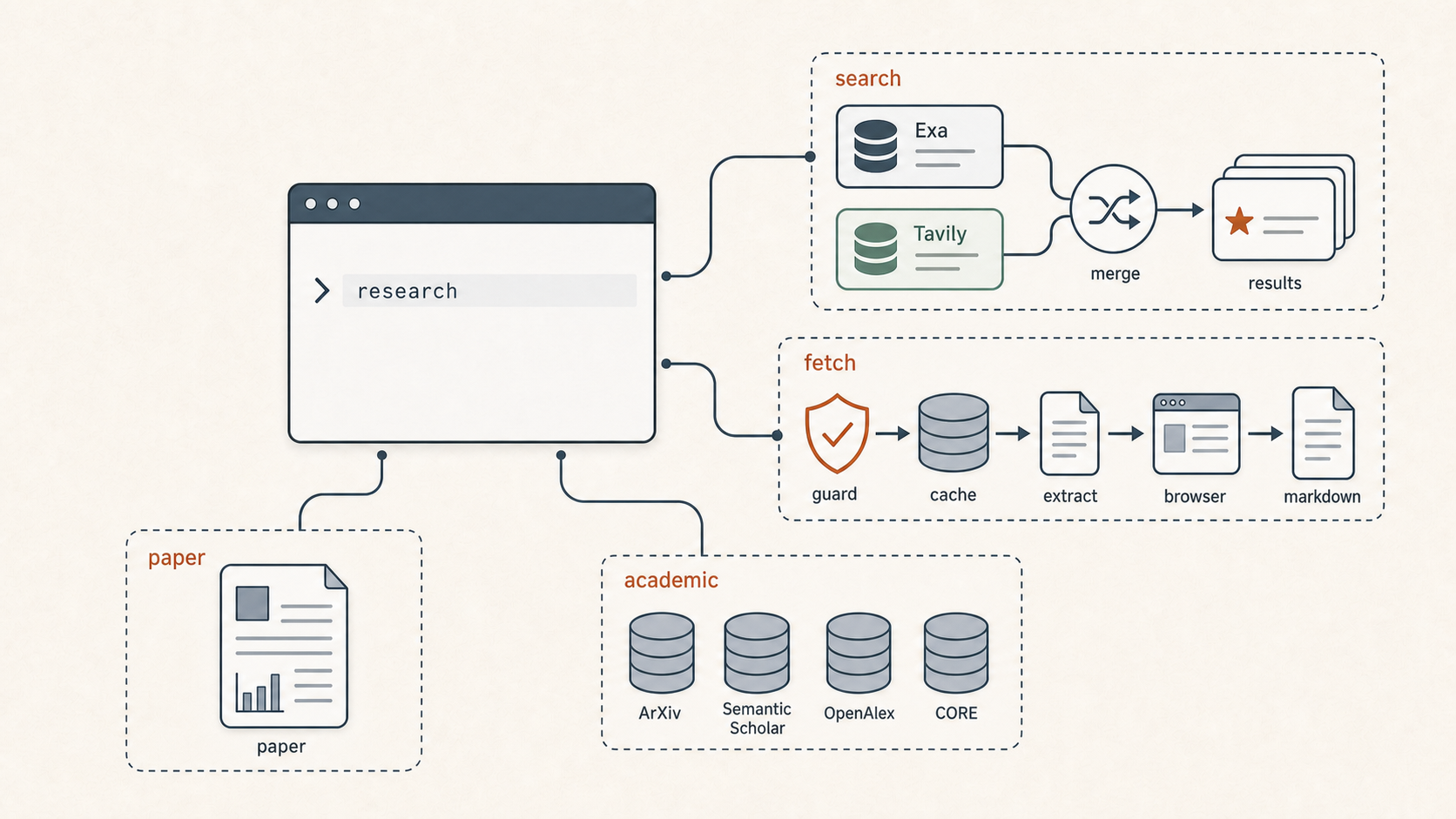
Now for a new type of post: the tool showcase, a series dedicated to the tools our fleet uses. Each post covers one tool: its origin, its usage, and its value. First up is the research CLI, because it was one of the first tools in my fleet that I put real engineering time into, and because the story behind it covers a decision I make over and over: when do you actually need a tool, and once you know you need one, do you build it, adopt it, or buy it?
The tool
research is a command-line tool my agents and I share. Four subcommands cover most of the surface. research search sends a query to two commercial search indexes at the same time and merges the results. research fetch downloads a web page and converts it into clean markdown. research paper looks up a single academic paper, and research academic fans the same query out to four scholarly databases at once. Everything runs on my machine, the API keys sit in a local config file, and the output is plain text, which means an agent can call it exactly the way I do from a terminal.

The search side: one query, two indexes, one referee.
That last sentence carries most of the philosophy, but let me back up to where the need came from.
Knowing I needed a tool
My agents do research constantly. It is most of what the research side of my fleet exists for. And out of the box, an agent’s view of the web goes through built-in tools that are a middleman: the agent asks for a page or a search, and it gets back something. Something cleaned, something truncated, something summarized by a service I do not control and cannot inspect. Most of the time that is fine. But if research is the product, I want to know what my researchers actually read.
Think of it like hiring a careful researcher and then letting a stranger photocopy all of their sources. Pages go missing, nobody says which ones, and no matter how good the researcher is, the conclusions inherit the gaps.
So the need was not capability, it was trust. The agents could already search and fetch; I could not see what they were seeing. Trust is the through line in almost everything I write about agents, and it usually starts exactly here: before I lean on an agent’s answers, I want a way to see what those answers are built from.
Build, adopt, or buy
Before building anything, I had my research agents survey the landscape. What tools exist for agent research, what do they cost, what do they solve. The verdict that came back was clear and a little deflating: adopt, mostly. Good search APIs existed and were worth paying for. Academic databases had free APIs. Page extraction had a hosted service called Jina Reader that turns any URL into markdown, with a generous free tier. The conclusions file from that survey has a section literally titled around what did not need to be built, and the answer was: nearly all of it.
I followed most of that verdict, and the CLI still reflects it. The search layer is bought access: my keys, someone else’s index. Building a web index myself would be a hobby with no end, and no curiosity discount changes that math.
Curiosity overrides the flowchart
A day later I was back with a different question: what would it take to run the fetch myself?
There was nothing wrong with the hosted reader. I just wanted to know how it worked, and the answer changed the decision. Jina Reader turned out to be two layers. The first layer is plumbing: a headless browser plus Mozilla’s open-source readability code, the same code behind the reader view in Firefox. The second layer is where the quality lives: a small language model, about one and a half billion parameters, trained to do exactly one job, turning messy HTML into clean markdown. On that one job it scores better than models a thousand times its size. And the weights are published on Hugging Face under a noncommercial license, which is exactly what a personal setup like mine is. It needs about two gigabytes of memory, which my Mac has to spare.
So the quality advantage of the paid service was a model I could download. Once I knew that, the build-versus-buy math flipped for this one layer: the fetch is the exact part of the pipeline I wanted to see into, and owning it was suddenly cheap. The adopt verdict had been right on the evidence it had; digging one layer deeper changed the evidence. The rest was plain curiosity. I build things to learn how they work, and this time that was reason enough.
Engineering it to be reliable
The spec my research side handed to my engineering agent was about three hundred lines of Python, built around one simple rule: try the cheap way first, and only escalate when it fails. A plain HTTP request grabs the page, and an open-source library called trafilatura pulls the article text out of the raw HTML. Tools that do that job, separating the readable content of a page from the markup and clutter around it, are called extractors. If trafilatura’s result looks thin, a second extractor takes a pass. Only if the page comes back effectively blank, which usually means a JavaScript app, does the tool launch a real browser to render it. Around three quarters of research-relevant pages never need the browser, so the common path stays fast.

The fetch decision tree: cheap first, escalate only on failure. Whatever survives is cached on the way out.
My favorite finding from that spec work: trafilatura is the most accurate extractor available not because it has the best algorithm, but because it runs several strategies and holds onto whichever result came out cleanest. It wins by refereeing. The CLI pulls the same move at the search layer, querying both indexes in parallel and merging what comes back. I did not plan that symmetry, but I trust the tool more because of it.
The reliability lessons came from living with it. The one that stung: one of the paid search keys quietly ran dry, and the CLI kept answering from the remaining sources without a word. The results looked normal and were quietly worse. I wrote about that night in an earlier post; the fix here was small and permanent, a single warning line that names every source it skipped, every run. A tool the whole fleet leans on does not get to degrade without saying so.
The other guards are the unglamorous kind. The fetcher refuses to touch addresses inside my own network, so a malicious page cannot use it as a bridge to things only my machine can reach; the name for that attack is server-side request forgery, and it is worth knowing. Fetched pages land in a local cache with expiry matched to how fast content goes stale: papers keep for a month, documentation for a week, news for a day. And the default search asks for exactly ten results, because ten is what the flat search price includes. Costs get managed in the defaults, where nobody has to remember them.
What owning it bought
The keys never leave my machine. The fleet and I use the same tool, so when an agent tells me what a page said, I can run the identical command and see the identical text. When extraction breaks on some page, I can tell which stage broke instead of filing a ticket with a service. None of that shows up in a feature comparison, and all of it is the point.
The part that compounds is the understanding. Because we opened up the reader service instead of just subscribing to it, I know what my agents read and why it looks the way it does. Because the survey ran before the build, I know which layers I am renting on purpose. The tool is useful every day. Knowing where every piece of it came from is what I actually paid for, and that part I would not outsource.
More of these showcases to come. The shed has plenty of tools in it.